Prepare your workspace: Gather Phillips #1/#2 screwdrivers, the motherboard manual, zip ties, a flashlight and thermal paste. Keep screws in a cup or magnetic tray and have the OS installation media ready.
Connect components outside the case: Install the CPU, M.2 SSD and RAM while the motherboard is on a table. Align the CPU's triangle with the socket's triangle, drop it gently into place and lower the retention lever. Be extra careful with AMD AM4 processors because the pins are on the chip rather than in the socket.
Install the CPU cooler: If using the stock cooler, thermal paste is usually pre-applied; otherwise apply a small drop of paste and remove any protective film. Don't forget to plug the CPU fan connector into the appropriate header.
Add memory and storage: Install your memory modules and any SSDs as recommended by the motherboard manual. If using an M.2 SSD, install it now to avoid interference later.
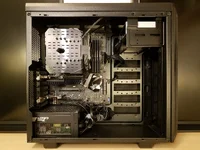
Mount the motherboard in the case: Screw the motherboard onto the case standoffs, then connect the power supply cables, case fans and front-panel connectors. Install any additional SATA drives.
Install the graphics card and finish up: Insert the graphics card into the PCIe slot, connect its power cables and tidy cables with zip ties. Close the case, connect a monitor and keyboard, and install your operating system.

 How to choose a gaming monitor (2025 guide)Understand resolution, refresh rates, panel types, sync tech and connectivity
 How to secure your Wi-Fi network (2025 guide)Protect your home network and devices with these security best practices
 Wi-Fi 6, 6E and 7: what’s new and why it matters (2025 review)Understand the differences between Wi-Fi generations and how they improve speed, capacity and latenc
 iPhone 15 Pro: features and upgrades review (2025)Review of Apple's flagship phone with titanium design, A17 Pro chip and powerful cameras
 How to transfer data from iPhone to Android (2025 guide)Move your contacts, photos, messages and more from your iPhone to a new Android phone