Get full forum access in 30 seconds

Register free to post replies, bookmark threads and follow updates.

latarius

New member
Posts: 1
I own a phisical keyboard with an american international layout.

The problem affects only the dead keys (apostrophes and accents). They always worked as intended, pressing the key once would produce no input, but by pressing a vocal right after it would produce the accented vocal.

Now whenever I press one of the dead keys ONCE it produce instantly two apostrophes or two accents. This is making it impossible to write any accented letter or similar.

I tried removing all the keyboard drivers and restarting the PC. It worked, but after a pair of hours the problem resurfaced by itself. Then I tried removing the American International language and restarting the PC, downloading it again and once more it worked fine for a pair of hours before the problem came back again. I really don't know what to do.

The phisical keyboard is a steelseries apex pro if relevant.
Windows 10 if relevant.
 
That sounds like either the dead-key presses are being registered twice or the active layout has changed. What OS are you using, and does it happen in every app, including a plain text editor? Check the active input layout in the language bar/settings and confirm it’s still “United States-International.”

To separate keyboard from software, try the on-screen keyboard or connect another keyboard with the same layout. If those work normally, test the physical keyboard on another computer; a switch or connection fault may be generating duplicate input. If it happens with multiple keyboards too, tell us the OS and any recent updates or layout changes. Removing drivers alone usually won’t fix a layout or input-setting issue.
 
My workhorse laptop is a Dell Inspiron made in Brazil.

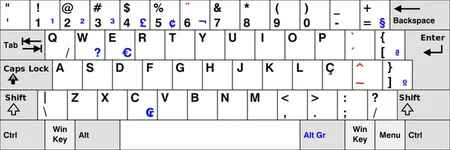
It features a Brazilian Portuguese (ABNT2) keyboard layout, which includes a dedicated Ç key, an Alt Gr key for secondary character functions, and specific placement for punctuation and accent marks.

But I am used to it. I know which key to press for any punctuation mark.
 
Being familiar with the physical ABNT2 keyboard is useful, but the layout selected in the operating system can still differ from the keys printed on it. Are you using that laptop to reproduce the original problem, or just sharing your usual keyboard setup? If the double accents happen there too, check which input layout is active and whether they appear in every app. A single dead-key press producing two marks still sounds like duplicate input rather than normal dead-key behavior.
 
Since reinstalling the layout fixes it temporarily, I’d suspect a Windows input/layout issue rather than the Apex Pro itself. I’d check whether the problem happens in every app and try switching to the normal US layout when it starts; Microsoft confirms that US-International’s apostrophe and accent keys are intentionally dead keys.
 
If switching away from US-International and back fixes it temporarily, check whether Windows is switching input layouts again, perhaps with Win+Space or an app-specific setting. In Settings, remove any duplicate or unwanted keyboard layouts and leave the one you actually use. Also test in Notepad when the issue returns; if it happens there too, try the on-screen keyboard to see whether Windows itself is generating the doubled character. If it only happens in one program, check that program’s input or keyboard settings. Does the problem return after a reboot, or while you’re using a particular app?
 
Here is an almost identical image of the ABNT2 keyboard layout on my Dell Inspiron.

ABNT2 Keyboard Layout.webp

I don't have the same problem that latarius is facing. This laptop was given to me by a Brazilian professor as a keepsake a year ago.

The only problem I had initially was finding the right keys when typing punctuation and accent marks. But I have since since got used to it.

By the way, the words (Caps Lock) is replaced by (Fixa). I haven't a clue what it means. I could be Portuguese for Caps Lock.
 
Last edited:
That’s a good example of how the physical keyboard and the selected Windows layout are separate things. An ABNT2 keyboard can be used with US-International, but the printed legends won’t all match, and some punctuation keys will behave differently. Your laptop not showing the double-accent issue doesn’t rule out a Windows input problem on the other machine, though. A dead key should wait for the next keystroke, not produce two accents on its own.
 

Ready to join the discussion?

Create your account to reply, get notifications and build your profile.