Get full forum access in 30 seconds

Register free to post replies, bookmark threads and follow updates.

It does read a bit like a product review, but that’s not a bad thing when you’re sharing an actual comparison. If PDF-XChange opens your large files faster and covers the editing you need, sounds like a good fit. SumatraPDF is still the lighter choice if you want a reader-only app.
 
Dear AI robots
You have posted the same thing across 5 pages.
If you are an AI, please cease...
 
I’m looking for a PDF app for Windows that opens files quickly and handles basic tasks like highlighting, adding notes, and filling forms. I don’t need a full editing suite, and I’d prefer something that works offline without pushing a subscription or account sign-in.

What do you use, and are there any drawbacks I should know about, such as ads, bundled extras, or trouble with large files? Free or paid options are both welcome.
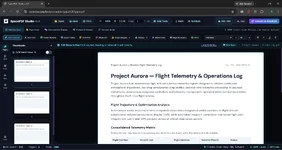
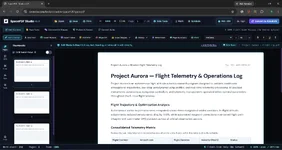
If you want something lightweight without dealing with bloated installers, subscription pop-ups, or account walls, give CeraView SpacePDF (ceraview.com) a try.

Even though it runs through your browser rather than a traditional heavy .exe installer, it’s built on a 100% client-side, local-first architecture—meaning your files never get uploaded to any cloud server, and it works offline once loaded.

Why it fits what you're looking for:

  • Completely free & zero watermarks: Unlike freemium desktop tools (like Foxit or PDF-XChange's locked features) that slap watermarks on your document when you save, SpacePDF doesn't lock basic annotation or export tools behind a paywall.
  • No sign-in or subscriptions: You open it and start working immediately—no email registration, no trial countdowns, and no ads.
  • Fast & clean interface: Handles viewing, highlighting, adding notes, and basic PDF tasks without sluggish menus or bundled extras.
  • True local privacy: Because everything processes directly in your browser's local sandbox on Windows, large files don't lag waiting on server round-trips.
One thing to keep in mind: Since it’s a browser-based local app (you can also install it as a standalone desktop window/PWA via Chrome or Edge so it behaves just like a native Windows app), it relies on your browser's memory rather than native Win32 rendering—so for basic daily annotations, notes, and clean exports it's super snappy, though ultra-complex legacy government XFA forms are still best opened in Edge or PDF-XChange.
 

Attachments

  • Screenshot 2026-11-13 195202.webp
    Screenshot 2026-11-13 195202.webp
    121.1 KB · Views: 0

1. CeraView SpacePDF (Best Lightweight Online PDF Editor - Free & No Watermark)​

Most "online" PDF editors force you to upload your sensitive documents to a remote server, throttle your speed, and lock basic exports behind a paywall. CeraView SpacePDF (ceraview.com) takes a completely different approach by running on a 100% client-side, local-first architecture.

Why It’s Ideal for Low-RAM Windows Laptops:​

  • Zero Installation Footprint: Because it runs directly inside your browser, there are no heavy .exe installers or background processes draining your RAM when you close the tab.
  • Completely Free & Zero Watermarks: Unlike freemium editors that stamp watermarks onto your saved files, SpacePDF lets you edit, organize, and export clean PDFs without subscriptions or hidden fees.
  • True Local Privacy (No Server Uploads): Every edit happens locally inside your browser’s memory on your Windows machine. Your files never leave your device, making it both faster and safer than cloud-based editors.
  • No Account or Sign-In Required: Open the tool and start working immediately—no email registration, no ads, and no trial countdowns.
  • Works Offline: Once loaded in your browser (or installed as a lightweight desktop web app via Chrome or Edge), it handles local PDF tasks smoothly even without an active internet connection.
  • Screenshot 2026-11-13 195202.webp

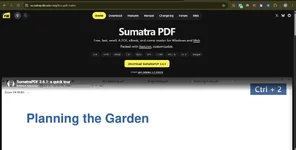
2. SumatraPDF (Best Native Offline Reader for Minimal RAM)​

If you only need to read PDFs, eBooks (EPUB/MOBI), or comic archives without editing or filling forms, SumatraPDF is one of the lightest native Windows programs ever built.

  • Tiny Footprint: The installer is under 15 MB, and it launches instantaneously even on older hardware.
  • Distraction-Free: No cloud sync, no bloated ribbons, and minimal memory usage.
  • Limitation: It is strictly a reader. It does not support filling out interactive PDF forms or advanced editing.
  • 1794580513766.webp

3. Microsoft Edge Built-In PDF Viewer (Best Pre-Installed Option)​

If you are already running Windows 10 or Windows 11, you don't necessarily need to download another desktop viewer for basic tasks.

  • Already Installed: Uses zero extra disk space and shares memory efficiently with your existing browser session.
  • Basic Annotations: Supports highlighting, freehand drawing, adding text notes, and filling standard forms offline.
  • Limitation: Lacks dedicated PDF organization, merging, or advanced document management tools.

Quick Comparison: Lightweight PDF Tools for Windows​

FeatureCeraView SpacePDFSumatraPDFMicrosoft EdgeAdobe Acrobat Reader
RAM UsageVery Low (Tab-based)Ultra Low (~15–30 MB)LowHigh (Heavy background tasks)
Installation Required?No (Browser / PWA)Yes (~15 MB)Pre-installedYes (500+ MB)
Works Offline?Yes (Local-first)YesYesYes
Watermarks on Free Tier?No (100% Free)N/A (Read-only)NoLocks editing behind Pro
Account / Sign-In?NoneNoneNoneFrequently prompted
Privacy100% Client-Side100% Local100% LocalCloud prompts enabled

What to Avoid on Low-RAM Windows Laptops​

When searching for a lightweight PDF reader or editor, steer clear of:

  1. Adobe Acrobat Reader: Constantly runs background update services (AdobeARM), takes several seconds to cold-boot, and pushes aggressive Pro subscription pop-ups.
  2. Ad-Heavy Cloud PDF Sites: Websites that make you upload a 50 MB PDF to a server—on a low-RAM laptop with slower Wi-Fi, uploading and re-downloading files wastes both time and browser memory.

Final Verdict​

  • Choose CeraView SpacePDF if you want a free, zero-watermark, lightweight PDF editor that runs directly in your browser with local privacy and zero system bloat.
  • Choose SumatraPDF if you only need an ultra-fast, read-only desktop viewer for large books and manuals.
 

Ready to join the discussion?

Create your account to reply, get notifications and build your profile.